
WordPress powers 43% of all websites globally — that’s over 800 million websites. If your business is one of them, you need WordPress developers. But hiring them is challenging.
Unlike full-stack developers who work across multiple tech stacks, WordPress developers specialize in a specific ecosystem. This makes them different to hire, vet, and manage.
This complete guide covers everything you need to know about hiring WordPress developers in 2026 — technical specifications, vetting processes, cost breakdowns, common mistakes, and advanced hiring strategies.
Based on helping 500+ companies hire developers across multiple specializations, here’s the definitive guide to hiring WordPress developers.
Table of Contents
Part 1
Understanding WordPress Developers
Who Are WordPress Developers?
WordPress developers are specialists who build, customize, and maintain WordPress websites and applications. They specialize in:
⚠️ IMPORTANT DISTINCTION
A WordPress developer is NOT the same as a full-stack developer. WordPress specialists understand the nuances, best practices, and deep architecture of the WordPress ecosystem — they work faster, write cleaner code, and handle security properly.
Why Hire WordPress Developers?
The economics tell a clear story:
Full-Time Local Hire
💼 Salary: $60K–$120K/yr
🏥 Benefits: $15K–$30K/yr
🏢 Taxes & Overhead: $20K–$40K/yr
Total: $95K–$190K/yr
Remote WordPress Developer
💻 Monthly Rate: $1,500–$2,500
✅ No benefits cost
✅ No taxes/overhead
Total: $18K–$30K/yr
Your Annual Savings
$65,000 – $172,000
per developer, per year
6 Types of WordPress Developers
Theme Developer
Specializes in theme development, HTML/CSS/JavaScript, and responsive designs.
✦ Best for: Website redesigns, custom theme creation
Plugin Developer
Deep knowledge of WordPress hooks, filters, APIs and PHP expertise.
✦ Best for: Custom functionality, WooCommerce customization
Full-Service Developer
Handles themes, plugins, maintenance, and optimization — most versatile option.
✦ Best for: General development, ongoing projects
WooCommerce Specialist
Product setup, payment gateway integration, conversion optimization.
✦ Best for: Online stores, e-commerce scaling
Maintenance Specialist
Updates, security, performance optimization, backup management.
✦ Best for: Ongoing maintenance, support
DevOps / Infrastructure Specialist
Server setup, hosting optimization, database optimization, security hardening.
✦ Best for: Large-scale sites, performance-critical applications
Part 2
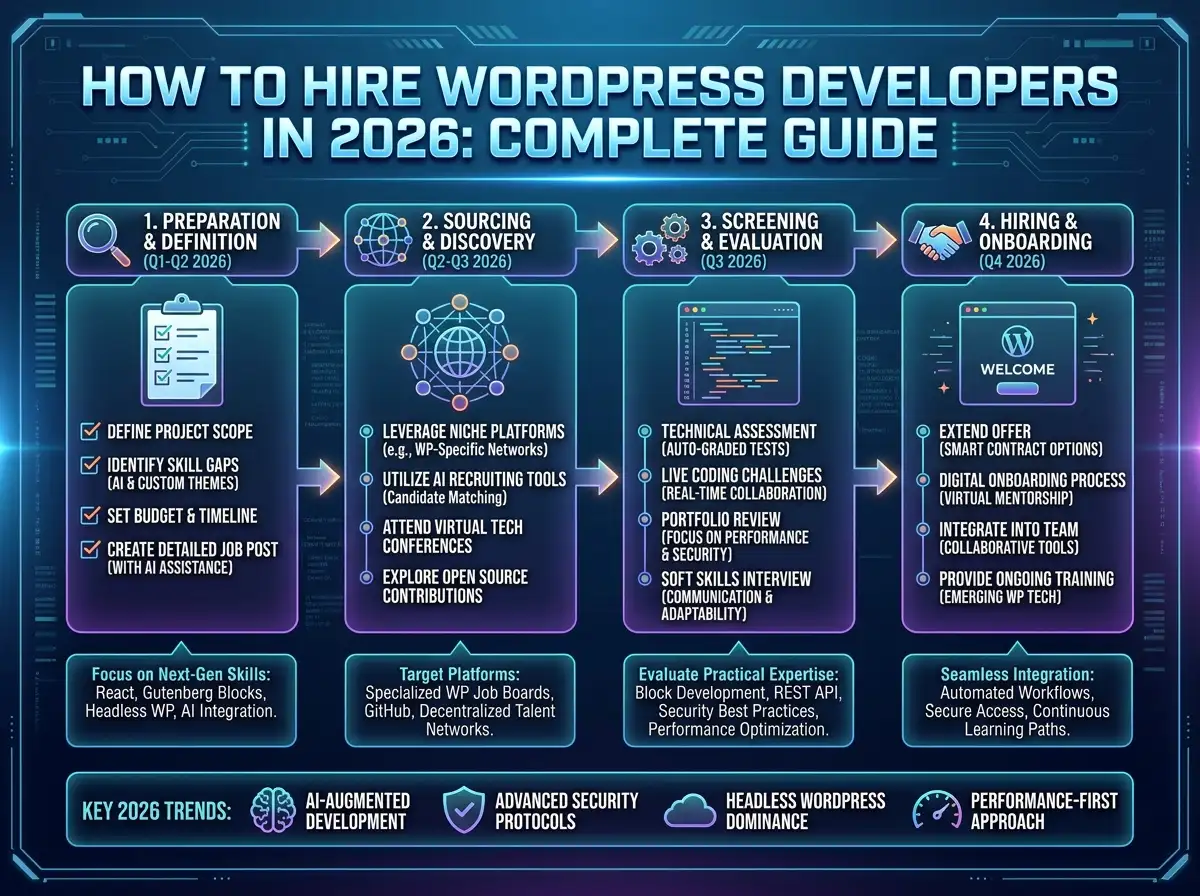
The Hiring Process
Define Your Requirements (24–48 Hours)
Before hiring, get crystal clear on what you need. Define these technical details:
Project Type Checklist
☐ New website from scratch
☐ Website redesign / migration
☐ Adding custom functionality
☐ WooCommerce store setup
☐ Ongoing maintenance / support
💡 Pro Tip: Create a requirements document, share with your team, and get alignment before hiring. This prevents hiring the wrong person and saves weeks of back-and-forth.
Find Pre-Vetted Developers (5–7 Days)
The biggest mistake: Posting on freelance platforms and hiring the first person who applies. This leads to unqualified developers, poor code quality, and budget overruns.
What Pre-Vetting Includes:
✓
✓
✓
✓
✓
🚩 Portfolio Red Flags
❌ No real WordPress sites in portfolio
❌ Only WordPress.com experience (different from .org)
❌ No security knowledge mentioned
❌ References unavailable or unresponsive
Technical Interview & Assessment (1–2 Weeks)
Conduct 3 rounds to thoroughly vet technical depth and cultural fit.
Round 1: WordPress Deep-Dive (45–60 min)
“Explain the difference between theme functions.php and custom plugins for adding functionality”
“Describe the WordPress action and filter hook system”
“How would you optimize a slow WordPress site?”
“Explain nonces and sanitization in WordPress”
Round 2: Project Fit & Communication (30–45 min)
Assess professional communication, structured workflow, documentation habits, and how they handle client relationships.
Round 3: Practical Coding Test (4–8 Hours)
Give a real-world task — create a custom post type, build a plugin, or optimize database queries.
💡 Pay them for their time. It shows respect and prevents flakes.
Review Portfolio & References (3–5 Days)
Call previous clients and ask: “Did they deliver on time and budget?” “Would you hire them again?” “Any concerns?”
Request 3–5 live WordPress sites, GitHub/code samples, and verify they aren’t taking credit for team projects.
Make the Offer & Negotiate (3–7 Days)
Expect a 10–30% counter-offer — that’s normal. Always get it in writing with a contract covering scope, deliverables, payment terms, IP ownership, and termination clauses.
Onboard & Integrate (First 30 Days — CRITICAL)
Poor onboarding kills even great hires. This is the most important phase.
Week 1
✓ Access & environment setup
✓ Codebase review
✓ First small achievable task
Week 2
✓ Code review feedback
✓ Bigger task assigned
✓ Celebrate first delivery
Week 3
✓ More complex tasks
✓ Reduced hand-holding
✓ Team process integration
Week 4
✓ Mostly independent
✓ Weekly check-ins
✓ Plan next phase
Part 3
Costs & Compensation
Pricing by Experience Level
| Experience Level | Monthly Rate | Annual Cost | Best For |
|---|---|---|---|
| Junior (0–2 yrs) | $800–$1,200 | $9,600–$14,400 | Learning projects, support |
| Mid-Level (2–5 yrs) | $1,200–$1,800 | $14,400–$21,600 | Most projects |
| Senior (5–10 yrs) | $1,800–$2,500 | $21,600–$30,000 | Complex projects, leadership |
| Expert (10+ yrs) | $2,500–$4,000+ | $30,000–$48,000+ | Specialized expertise |
Part 4
Common Mistakes & How to Avoid Them
❌ Mistake 1: Hiring Based on Cheap Rates Only
A $500/month developer takes 2× longer and delivers lower quality — often costing more in the end. Cheap rates = less experience = more bugs = expensive fixes later.
✅ Solution: Focus on value (quality, speed, expertise), not just rate.
❌ Mistake 2: Not Verifying WordPress Expertise
Many developers know WordPress superficially. If they can’t explain WordPress architecture, don’t know the plugin ecosystem, or lack security awareness — they’re not a specialist.
✅ Solution: Ask specific WordPress questions. Review portfolio projects. Check references.
❌ Mistake 3: Poor Project Definition
Hiring without clear scope leads to deliverables that don’t match expectations, refund disputes, and wasted time for both sides.
✅ Solution: Define requirements upfront. Get agreement in writing.
❌ Mistake 4: Unrealistic Timelines
A basic WooCommerce store takes 2–4 weeks. A complex store with integrations takes 2–3 months. Rushing leads to poor quality, burnout, and missed deadlines anyway.
✅ Solution: Discuss timeline realistically. Build in buffer time.
❌ Mistake 5: No Onboarding or Communication
Handing off the project and disappearing guarantees the developer misses your preferences and the code doesn’t meet standards.
✅ Solution: Invest in proper onboarding. Stay available. Regular communication.
❌ Mistake 6: Ignoring Security & Best Practices
Hiring for speed only results in insecure code — leading to hacked websites, malware, and data breaches.
✅ Solution: Always ask about security practices. Verify code quality. Make security non-negotiable.
Part 5
Best Practices & Advanced Strategies
🏆 Best Practice 1: Portfolio Assessment Framework
Score each project 1–5 on: design quality, code organization, performance, security, functionality complexity, and client satisfaction. 20+ = strong developer. 15–20 = solid. Under 15 = consider other options.
🏆 Best Practice 2: Trial Projects
Before committing long-term, give a small paid trial project (2–4 weeks). You’ll see actual code quality, communication style, and whether they deliver on time. Then decide on longer commitment.
🏆 Best Practice 3: Hire Specialists for Serious Projects
For complex WordPress projects, specialists always outperform generalists — they know the nuances, work faster, and produce higher-quality code. Use generalists only for simple sites or multi-tech projects.
🏆 Best Practice 4: Build Long-Term Relationships
Keep great developers for 6–12 months even if the project slows. They know your codebase intimately, can handle maintenance/updates, and deliver faster with lower overhead. Long-term relationships = better outcomes.
Part 6
WordPress Developer Alternatives
🧱 Page Builders
Elementor, Divi, Beaver Builder — build without coding.
⚠ Limited customization
🔌 Pre-Built Plugins
WooCommerce, Yoast, All in One SEO — ready-made features.
⚠ Less customizable
🏢 WordPress Agencies
Full-service development for complete projects.
⚠ Expensive, less control
💻 Freelance Platforms
Upwork, Fiverr — quick hiring for small one-time tasks.
⚠ Variable quality, hard to vet
When should you hire a developer?
✓ Need custom functionality or integrations
✓ Want optimized performance and professional code quality
✓ Need ongoing maintenance and security
✓ Have complex requirements beyond what page builders offer
Part 7
FAQ & Final Tips
Related Reading
How to Hire Remote Developers & Scale Your Business
vispantalent.com
How to Save $30,000/Year Hiring Vetted Remote Talent from India
vispantalent.com
Maximizing Efficiency with Remote Executive Assistants
vispantalent.com
How to Choose the Right Remote Executive Assistant
vispantalent.com
The Future of Work: Embracing Remote Executive Assistants
vispantalent.com
Explore All Articles on the Vispa Talent Blog
vispantalent.com
Ready to Hire?
Find Pre-Vetted WordPress
Developers in 2–3 Weeks
Skip the freelance lottery. Get 3–5 hand-picked specialists matched to your project.